
Initialize the Product Guide with URL Parameters
Goals of using URL parameters
Section titled “Goals of using URL parameters”You can use URL parameters for the following goals or use cases:
-
preset answer options for e.g. banners or landing pages: You want to create a banner with e.g. “new full-suspension mountain bikes for women”.
-
you then do not want to start the “blank” Product Guide, but preset the “gender question” to female
-
Perhaps you also want to skip the stage of the Product Guide containing the “gender question”, so that the Product Guide directly opens with the next stage
-
-
the same logic applies for landing pages that address a specific target group, or highlight your latest product innovations (e.g. “explore our new carbon fibre e-bike series.”). This example would preset answer options of material or product category, as well as perhaps a “new” flag or a product launch date attribute.
-
preset the Product Guide with user profiles
-
maybe your CMS or shop system is smart enough to dynamically display banner content based on a user profile that you tracked, e.g. you know the user is female. This technically is the same banner example as explained above, except that the banner was displayed dynamically from your shop system
-
if your CMS or shop system has the capability to manage user profiles via e.g. user login functionalities. You could then implement intelligent functions to utilize the full power of the Product Guides, e.g.
-
store the purchase history of the user and hand over favorite brands to the user
-
store the order return history
-
-
Examples
Section titled “Examples”An integration URL as generated in the Workbench’s Publish View can be extended by various parameters to preset answer options or move to a stage initially. These parameters can be supplied in the query part or the hash part of the URL. Here is an example using query parameters:
//service.excentos.com/demo/DE/app_Bike-Advisor/en_US/loadadvisor?theme=default&$bike_type=mountain_bike&$gender=maleIt also possible to use hash parameters:
//service.excentos.com/demo/DE/app_Bike-Advisor/en_US/loadadvisor?theme=default#$bike_type=mountain_bike&$gender=maleOr even mix both but this is not recommended. Note that the parameters are only evaluated the first time the advisor is loaded, the theme changes or the channel ID was modified. Any other changes have no effect. You can change this by adding the ‘xcReset’ parameter.
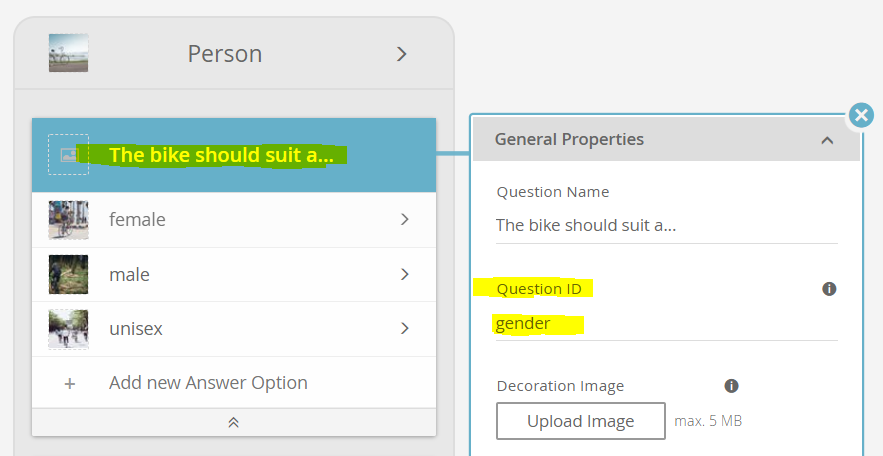
How to identify the IDs of questions and answer options
Section titled “How to identify the IDs of questions and answer options” In order to set the URL parameters, you need to identify the IDs of the
corresponding questions and answer options. The easiest way to identify
the IDs is to look them up at the corresponding *questions* and *answer
options* in the Concept Board of your Workbench account. Here is an
example of the **question ID**:
In order to set the URL parameters, you need to identify the IDs of the
corresponding questions and answer options. The easiest way to identify
the IDs is to look them up at the corresponding *questions* and *answer
options* in the Concept Board of your Workbench account. Here is an
example of the **question ID**:
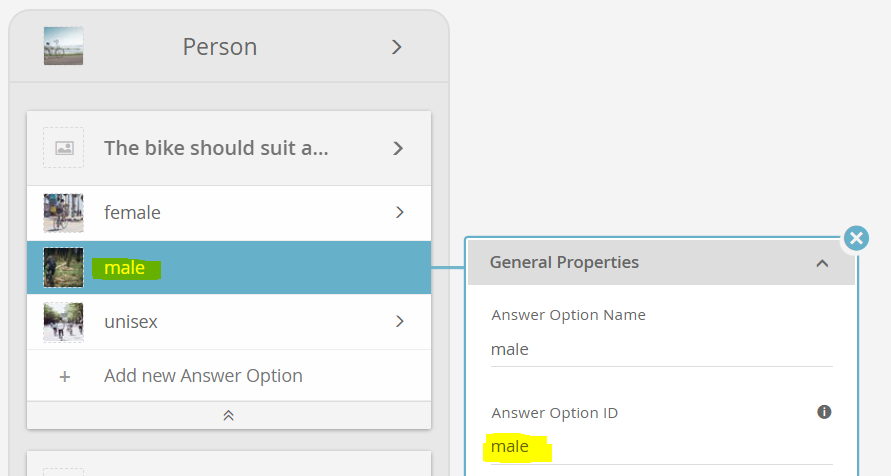
Here is an example of how to look up the ID of an answer option:
Overview of possible parameters
Section titled “Overview of possible parameters”Parameter |
Description |
Example |
|---|---|---|
$question_id=option_id |
Sets the question to the answer option. For multi-selectable questions the option is added. |
$bike_type=mountain_bike |
xcStartAt=stage_id |
Sets the current stage to the given ID. |
xcStartAt=xcAjaxClient.wizard.recommendations |
xcReset |
Clears any previous values in the user profile. |
xcReset |
Set initial answer options
Section titled “Set initial answer options”You can select answer options by adding one or more parameters of the form
$question_id=option_id
//service.excentos.com/demo/DE/app_Bike-Advisor/en_US/loadadvisor?theme=default&$bike_type=mountain_bike
For single selectable questions, this removes any previous option value. In multiple-selectable questions the option value is added.
If you want to select more than one option of a question (only possible for multi-selectquestions), simply add another parameter with the same name:
$question_id=option_id_1&$question_id=option_id_2&...
//service.excentos.com/demo/DE/app_Bike-Advisor/en_US/loadadvisor?theme=default&$bike_type=mountain_bike&bike_type=race_bike
Note: The any value containing special characters for questions using automatic option mapping are automatically escaped.
Move to an initial stage
Section titled “Move to an initial stage”Starting the Product Guide in another stage than the first is done by the parameter:
xcStartAt=<internal path without 'groups'>
//service.excentos.com/demo/DE/app_Bike-Advisor/en_US/loadadvisor?theme=default&xcStartAt=xcAjaxClient.wizard.recommendations
Forcing a fresh user profile
Section titled “Forcing a fresh user profile”Sometimes, the advisor is required to start with a fresh profile. The parameter ‘xcReset’ does just that. But it also clears the user profile anytime the page is refreshed or the user navigates back to the advisor.
Using URL parameters on the integration page
Section titled “Using URL parameters on the integration page”The same parameters described above can also be supplied on the URL of
the page that integrates the Product Guide. The Product Guide evaluates
the referrer URL for these parameters, so any $question_id=option_id,
xcStartAt, or xcReset parameter present on the integration page’s
URL is applied just as if it had been added to the loadadvisor URL
directly.
This is particularly useful for banner links or landing page
links that point to the page on which the Product Guide is embedded.
You can attach the xc parameters to those links and the Product Guide
will pick them up automatically once it loads on the target page.
Example: a banner link pointing to your integration page can preset the bike type and gender like this:
https://www.your-shop.com/bike-advisor?$bike_type=mountain_bike&$gender=female